Ever notice that some of your best blog posts and articles slowly fade into obscurity? What once ranked on page one is now lingering on page three, and the traffic has all but dried up. This phenomenon, known as content decay, is incredibly common. But there’s a powerful and efficient SEO strategy to fight back: the content refresh.
Instead of constantly churning out new content, a content refresh focuses on updating what you already have to make it more relevant, accurate, and valuable. It’s one of the quickest wins in SEO because you’re building on an asset that Google already knows. In fact, since only about 5.7% of new pages reach Google’s top 10 within a year, revitalizing an existing page is often a much smarter bet.
This guide walks you through everything you need to know to plan and execute a successful content refresh that drives traffic and re-engages your audience.
What Is a Content Refresh (and Why Bother)?
A content refresh is the process of significantly updating an existing piece of content to improve its freshness, accuracy, and relevance. Think of it as more than just fixing a typo. It involves adding new information, updating old data, improving readability, and realigning the content with current search intent.
The goal is to turn a stale or underperforming page into a valuable, competitive asset once again.
Content Refresh vs. Content Update: What’s the Difference?
While often used interchangeably, there’s a subtle distinction.
- Content Update: This usually involves minor changes. Think of it like a quick oil change for your car. You might correct a few facts, add a new statistic, or rephrase a sentence. The core structure and message remain the same.
- Content Refresh: This is a more comprehensive overhaul, like replacing the car’s engine. It can involve rewriting entire sections, adding new subtopics, updating all the examples, and completely reworking the on page SEO.
Both are valuable, but a full content refresh is what typically leads to significant jumps in traffic and rankings.
Why Is a Content Refresh So Important?
Web content has a shelf life. Over time, information becomes outdated, competitors publish better articles, and what users are searching for changes. Plus, SERP features evolve, changing how and where results are displayed—another reason to refresh regularly. This leads to content decay, a gradual loss of traffic and rankings.
The upside is massive. HubSpot, for example, found that 76% of its monthly blog views came from old posts. By systematically performing a content refresh on these articles (adding new insights, images, and data), they managed to increased the number of monthly organic search views to updated and republished posts by an average of 106%. Backlinko saw an even more dramatic 260% boost in organic traffic just 14 days after refreshing their content library.
A regular content refresh helps you:
- Win back lost traffic and rankings.
- Improve user engagement and conversions.
- Strengthen your site’s topical authority.
- Get more value from your existing assets.
Building Your Content Refresh Strategy
Instead of randomly updating pages, a structured content refresh strategy ensures you focus your efforts for maximum impact. This means planning what you’ll update, when you’ll update it, and how you’ll measure success.
How Often Should You Refresh Content?
There’s no single answer, as the ideal frequency depends on your industry and the topic’s volatility. However, data gives us some solid guidelines:
- Highly Competitive Topics: For fast moving topics like “best software” reviews, top pages are often refreshed every 5 months or so. A good rule is to revisit these every 3 to 6 months.
- Evergreen Content: For stable, evergreen topics, a review every 6 to 12 months is usually sufficient to keep things current.
- High Difficulty Keywords: One study found that content for very competitive keywords was updated every 320 days on average.
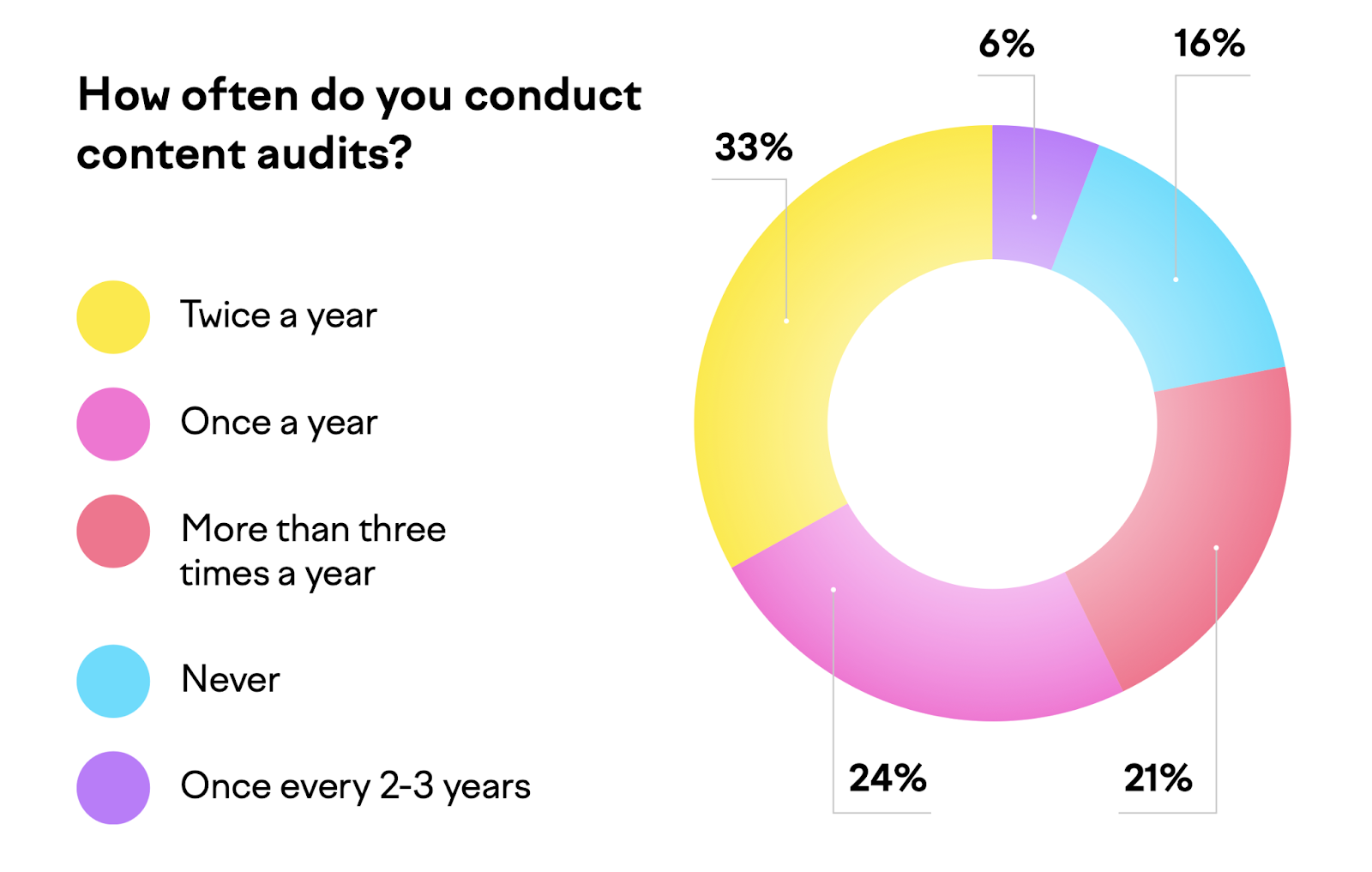
A good starting point is to conduct a content audit twice a year. Surprisingly, only 33% of marketers do this, meaning a consistent strategy can give you a serious competitive edge.
The Content Audit: Your Strategic Starting Point
Before you can refresh anything, you need to know what you have. A content audit is a systematic review of your website’s content to evaluate its performance. You’ll gather data like organic traffic, keyword rankings, bounce rate, and conversion metrics to identify which pages are:
- High performing: Winners you need to protect.
- Underperforming: Pages with potential that need help.
- Outdated or irrelevant: Pages you might remove or merge.
This audit is your roadmap. You can’t fix what you don’t measure, and this process pinpoints your best opportunities.
How to Identify and Choose Content for a Refresh
With your audit complete, it’s time to prioritize. Focus on pages that offer the highest potential return on your effort.
- Pages with Decaying Rankings and Traffic: Look in Google Analytics for pages with a year over year drop in organic traffic. In Google Search Console, find pages with declining impressions and clicks. About 36% of marketers use this signal to decide what to update. These are your prime candidates for a comeback.
- High Value Pages on the Brink: Do you have content ranking on positions 4 through 10 for a high volume keyword? A content refresh could be all it takes to push it into the top 3, where click through rates are significantly higher.
- Outdated Information: This is the most common trigger, with 44% of marketers update existing content every time they see it has become outdated. Look for articles with old years in the title, outdated statistics, or obsolete advice.
- High Business Priority: Some pages are critical to your business, like a cornerstone service page or a high converting product comparison. Even if their traffic is stable, a proactive content refresh ensures they remain competitive.
Start by creating a list of 5 to 10 high priority pages. This makes the process manageable and allows you to measure your results before tackling the next batch.
How to Execute a High Impact Content Refresh
Once you’ve chosen a page, it’s time to roll up your sleeves. A thorough plan ensures you address all the elements that contribute to performance.
Step 1: Plan the Refresh with a “What, Why, How” Analysis
For each page, diagnose the problem before prescribing a solution.
- What: What is the page’s purpose and who is it for? Reconfirm its target keywords.
- Why: Why is it underperforming? Is the information outdated? Are competitors more comprehensive? Does it have technical issues?
- How: How will you fix it? Create a specific list of changes, such as adding three new sections, updating all screenshots, and rewriting the introduction.
Step 2: Conduct a Competitor Analysis
Analyze the pages that are currently outranking you for your target keyword. The goal is to figure out what Google wants by seeing what it’s already rewarding. Look at their:
- Content Depth and Subtopics: What questions are they answering that you aren’t? Consider building a keyword cluster to organize related queries and cover the topic comprehensively.
- Format and Structure: Are they using tables, lists, or FAQs?
- Freshness: When was their content last updated? Studies show that top ranking articles make more frequent changes.
This analysis will give you a blueprint for making your content not just as good as the competition, but better.
Step 3: Use the Content Refresh Checklist
A checklist ensures you cover all your bases, from the words on the page to the technical details behind it.
✅ Update and Expand the Content
This is the core of the content refresh. Focus on elevating the quality, not just adding words.
- Update Information: Replace old stats, remove outdated references, and add new, verifiable data from credible sources.
- Improve Readability: Break up long paragraphs, use clear headings, and add bullet points or tables to make information easier to digest.
- Enhance E-E-A-T: Boost your content’s Experience, Expertise, Authoritativeness, and Trustworthiness. Add first hand insights, expert quotes, or personal experiences to show you have real world knowledge of the topic. Also implement author schema to reinforce expertise signals and trust.
✅ Optimize Keywords and On-Page Elements
Search language evolves. Make sure your page speaks the language your audience uses today.
- Revisit Keyword Research: Use Google Search Console to find new queries your page is getting impressions for. These are fantastic clues for expansion. Start by clarifying keyword intent to ensure your updates match what searchers actually want.
- Optimize Key Placements: Ensure your primary keyword appears naturally in your title tag, H1 heading, and the URL slug. Rewrite your meta description to be more compelling and include the keyword to improve click through rate.
- Refine the URL (With Caution): Ideally, your URL should already be short and keyword focused. Do not change your URL unless absolutely necessary, as it can cause SEO issues. If you must change it (for example, to remove an old year), be sure to implement a 301 redirect from the old URL to the new one.
✅ Refresh Links, Images, and Media
Broken links and dated visuals make a page feel abandoned and untrustworthy.
- Perform a Link Update: Fix or replace all broken links. Since January 2013, 66.5% of the links pointing to the 2,062,173 websites Ahrefs sampled have rotted. Add new internal links to and from other relevant pages on your site, aligning with guidance on how many internal links per page is ideal.
- Update Images and Alt Text: Replace outdated screenshots and graphics. If the page is text heavy, add new visuals to improve engagement. Remember to write descriptive alt text for every image to improve accessibility and image SEO. HubSpot saw a 106% traffic boost after updating old posts with new content and images.
✅ Improve Technical Performance
Great content can be held back by poor technical health. Use the refresh as an opportunity to tune up the page.
- Optimize for Page Speed: Compress images, minify code, and remove unnecessary scripts. A fast loading page is crucial, as Google found that a page load delay from 1 to 5 seconds can increase the probability of a user bouncing by 90%. A periodic technical SEO audit can also surface deeper performance opportunities.
- Check Above the Fold Content: The content a user sees without scrolling is critical. Make sure your headline is compelling and the most important information is immediately visible to reduce bounce rates.
Step 4: Handle the Publish Date Correctly
Once your changes are made, you need to decide what to do with the date.
- When to Update the Date: If you’ve made substantial changes, update the “last modified” date. This signals freshness to both users and Google.
- When Not to Update: For minor fixes like typos, there’s no need to change the date.
- AVOID Date Only Updates: Never, ever change the date without making meaningful content changes. It’s a misleading practice that Google can see right through and it destroys user trust.
After You Hit Publish: Next Steps
Your work isn’t done once the refreshed content is live. The final steps are what ensure you get the full value from your efforts.
Request a Recrawl in Google Search Console
To get your changes recognized quickly, manually ask Google to re-index the page.
- Log in to Google Search Console.
- Go to the URL Inspection tool and enter your page’s URL.
- Click “Request Indexing.”
This puts your page in a priority queue, often resulting in a recrawl within hours instead of days or weeks.
Monitor Traffic, Rankings, and User Experience
Track your results to see if the content refresh worked.
- Traffic and Rankings: Use Google Search Console to monitor impressions, clicks, and average keyword positions.
- User Engagement: Check Google Analytics for improvements in metrics like time on page, bounce rate, and conversion rates.
- Iterate if Needed: Not every refresh is a home run. If you don’t see improvements after a few weeks, you may need to analyze the page again for a more substantial rewrite. This is where a process of continuous improvement, like the “rewrite until it ranks” model used by services like Rankai, ensures that content eventually hits its performance goals.
Repromote Your Refreshed Content
Treat your refreshed article like a brand new piece of content.
- Share it on social media.
- Feature it in your email newsletter.
- Post it in relevant online communities or forums.
Repromotion gives your content a second life and an immediate traffic boost, sending positive engagement signals to search engines.
Conclusion: Make Content Refresh an Ongoing Effort
Keeping content up to date is not a one time task; it’s a continuous cycle of auditing, refreshing, monitoring, and repeating. The digital world doesn’t stand still, and your content shouldn’t either.
Many marketers neglect this process, with 16% admitting they never audit their content at all. This creates a huge opportunity. By building a systematic content refresh process, you can safeguard your SEO traffic, build trust with your audience, and consistently outperform competitors who let their content go stale.
For teams that find this process overwhelming, leveraging a dedicated service can be a game changer. An AI assisted, human managed service like Rankai bakes this continuous improvement cycle into their core offering, ensuring your content library is always working as hard as possible to drive results.
Frequently Asked Questions
What is the first step in a content refresh?
The first step is a content audit. You need to analyze your existing content’s performance (traffic, rankings, conversions) to identify which pages are the best candidates for a refresh based on their potential for improvement.
How much of the content should I change in a refresh?
This could involve adding new sections, removing outdated information, and rewriting existing paragraphs.
Can a content refresh hurt my SEO?
If done poorly, yes. The biggest risks are changing the URL without a proper 301 redirect, removing valuable content that was ranking for long tail keywords, or stuffing keywords unnaturally. A thoughtful, user focused refresh almost always helps.
How long does it take to see results from a content refresh?
Results can vary, but you can often see positive changes in rankings and traffic within a few weeks of Google re-indexing the page. Some case studies have shown dramatic traffic boosts in as little as 14 days.
Should I create new content or refresh old content?
You should do both. A healthy content strategy involves creating new content to target new keywords and expand your reach, while also performing a regular content refresh on existing posts to protect and enhance their performance. Refreshing is often more efficient for getting quick results.