Free Tools
How to Generate an XML Sitemap, for Free
A free, step by step guide to building a valid XML sitemap. Paste your URLs, export clean sitemap-ready XML in seconds, and help search engines and AI crawlers discover and index your most important pages faster.
Weeks of work that crawlers never found
I launched a content hub I had spent weeks on, then waited for the pages to start showing up in search. Days passed and most of them simply never appeared.
The pages were fine. The problem was that crawlers had no easy way to find them. There was no sitemap, so discovery was left to chance, and the deeper pages were effectively invisible to the engines I was counting on.
Tracing the silence back to a missing file changed how I launch anything now. A sitemap is the map you hand crawlers so they can find everything that matters. Without one, you are hoping search engines stumble onto your best work, and hope is not a strategy.
Why a sitemap matters
An XML sitemap is a simple list of the URLs you want crawled, in a format engines and AI crawlers can read instantly. It does quiet but important work.
- It speeds up discovery of new and updated pages, so they get indexed sooner.
- It helps engines find deep pages that internal links alone might miss.
- An invalid or incomplete sitemap quietly costs you coverage on the pages you care about.
You do not need to hand-write XML. You just need a clean, valid sitemap you can submit.
The Sitemap Generator turns your URLs into crawl-ready XML
Our team at RankAI built a Sitemap Generator, free to run.
You paste your URLs and it exports valid, sitemap-ready XML in seconds, with no manual formatting.
How to generate a sitemap for free, step by step
Step 1. Open the free tool
Go to rankai.ai/tools/sitemap-generator. It is free and you can start in seconds.
Step 2. Paste your URLs and generate
Add your Primary input (domain, brand, or query), then paste your URLs into Input lines (one per row), for example https://example.com/ and https://example.com/about. Click Generate Sitemap.
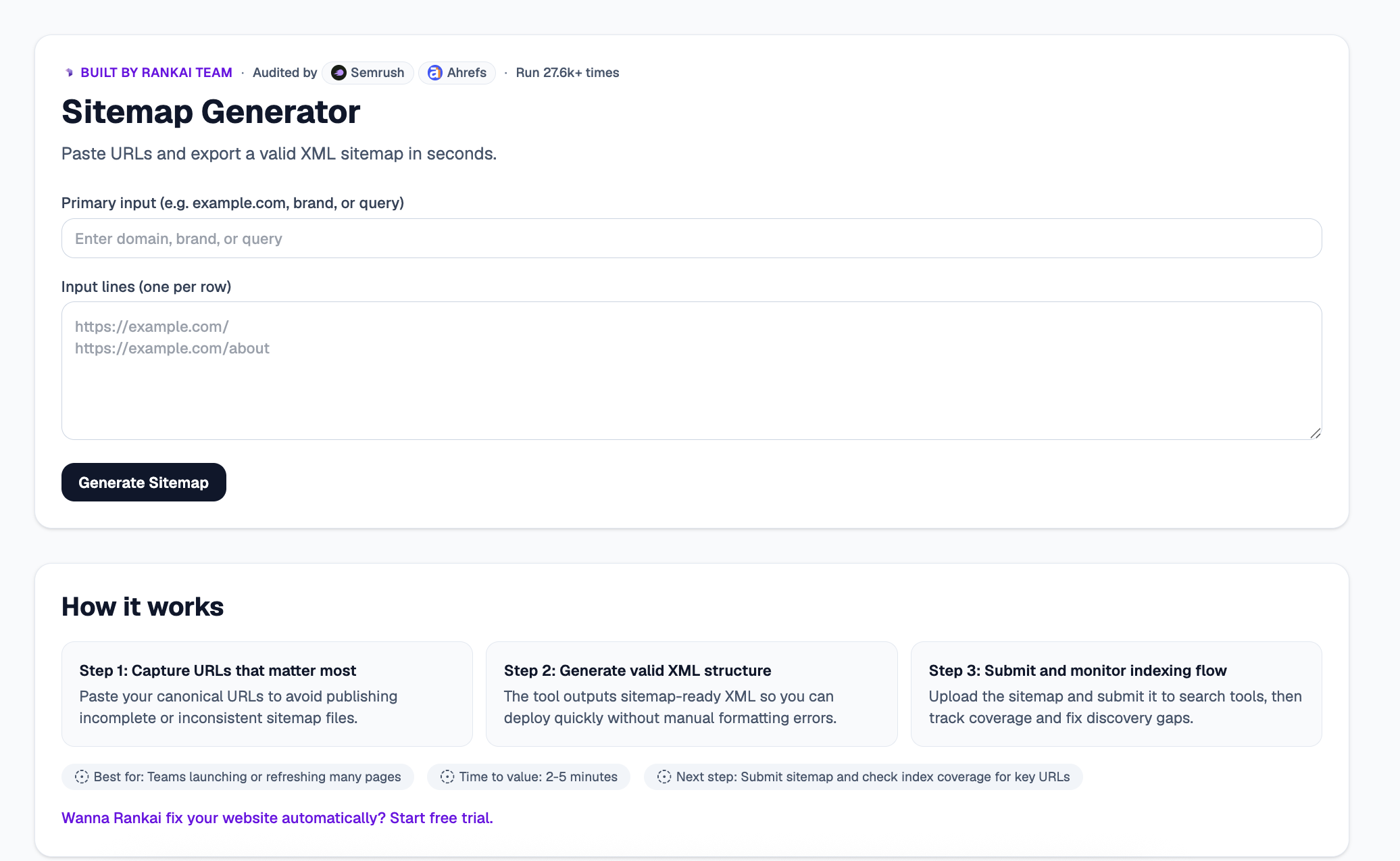
Step 3. Copy your sitemap-ready XML
In a couple of seconds you get valid XML you can deploy right away, plus the Top 3 insights on which URLs to prioritize and how to keep coverage clean.
Step 4. Expand "Raw details" for the full XML
Open the Raw details to see and copy the complete sitemap XML, ready to upload to your site and submit to search tools.
Step 5. Want to go deeper? Get the Full AI Visibility Audit
For a much more detailed look at your whole site, not just this one check, click Get Full AI Visibility Audit (or the free trial link on the tool).
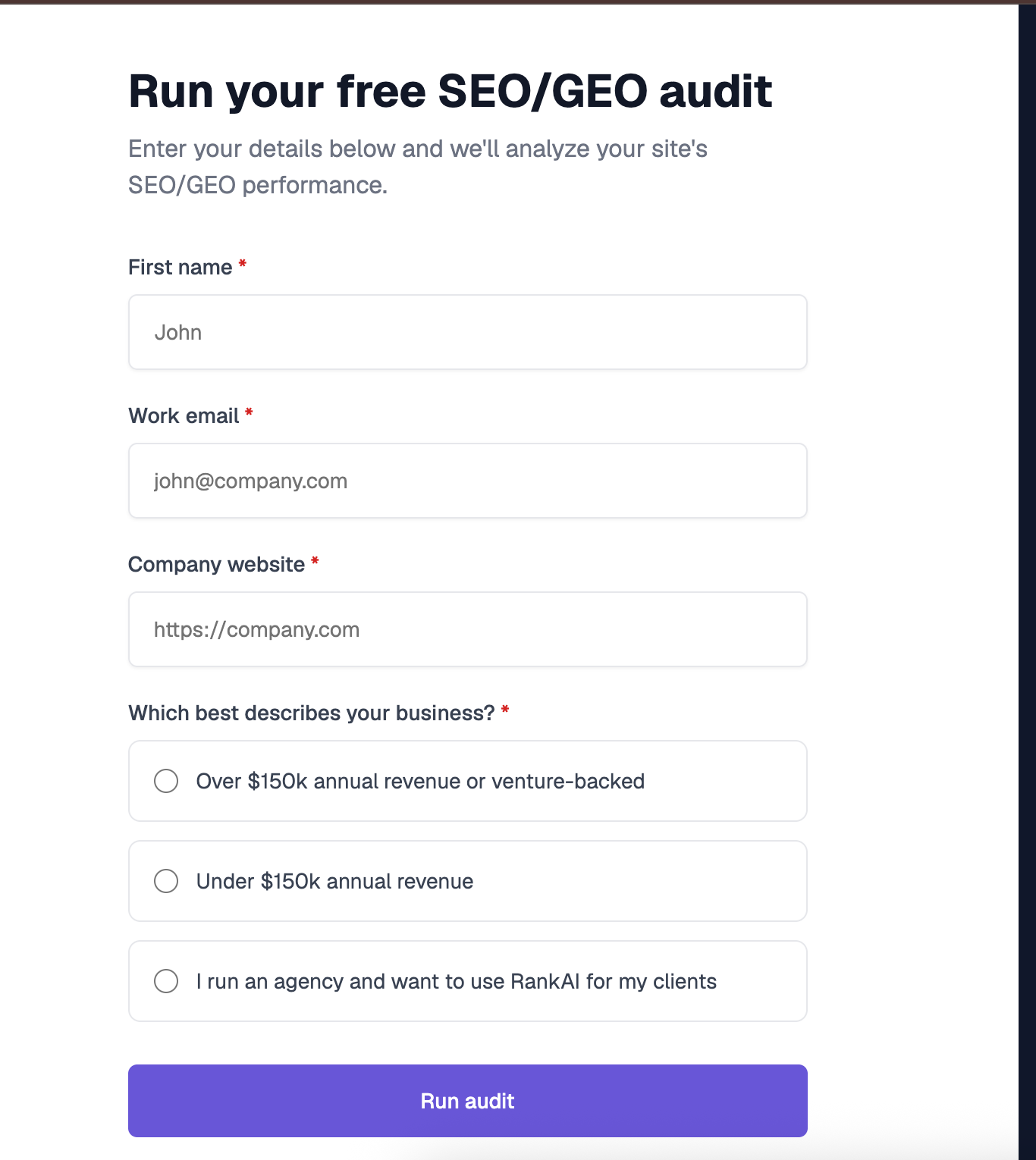
Step 6. Fill in your details to unlock the full audit (still free)
Enter your first name, work email, and company website, pick the option that best describes your business, and click Run audit. You get a far more detailed AI visibility analysis, still completely free, including a full, prioritized SEO and GEO optimization checklist.
What to do with your results
Once you have your sitemap, the highest impact moves are usually:
- Include canonical URLs. List the clean, canonical version of each page to avoid duplicate or inconsistent entries.
- Submit it to search tools. Upload the sitemap and submit it so crawlers pick it up quickly.
- Monitor index coverage. Track which URLs get indexed and fix discovery gaps over time.
Re generate the sitemap whenever you launch or refresh a batch of pages.
Frequently asked questions
What is an XML sitemap?
An XML sitemap is a structured list of the URLs on your site that you want search engines and AI crawlers to discover and index. It helps them find your pages faster and more completely.
Do I really need a sitemap?
For small sites it is helpful, and for larger or newer sites it is close to essential. A sitemap speeds up discovery of new pages and helps crawlers reach deep pages that internal links alone might miss.
How do I submit my sitemap?
Upload the XML file to your site, usually at the root, and submit its URL through your search engine tools. After that, monitor index coverage to confirm pages are being picked up.
Is the Sitemap Generator really free?
Yes. You can generate a sitemap at rankai.ai/tools/sitemap-generator for free, and the more detailed Full AI Visibility Audit is also free once you add your name, email, and website.
Does a sitemap help AI search discovery?
Yes. The same crawlers that feed AI answer engines use sitemaps to find your content, so a clean, complete sitemap helps your pages become discoverable and citable.
What will you do with my email from the full audit?
We use it to send your audit results and the occasional AI visibility tip, nothing more, and you can unsubscribe anytime.
Related resources
Try the free Sitemap Generator.
The complete topic guide to getting cited across ChatGPT, Perplexity, Gemini, and AI Overviews.
A free, step by step guide to auditing your headings. Inspect your H1 to H6 order, find missing or repeated...
A free, step by step guide to testing your social share preview. Check your Open Graph title, description...
Stop leaving your best pages undiscovered
Run the free Sitemap Generator, export valid XML in seconds, and get a prioritized plan to improve index coverage. Completely free.
