When we talk about writing SEO-optimized content, we’re really talking about creating articles that do two things exceptionally well: they give people exactly what they're looking for, and they're built in a way that search engines can easily understand and reward. It’s a craft that balances smart keyword use, genuinely helpful writing, and a few on-page technical tricks to climb the rankings and pull in organic traffic.
Why SEO Optimized Content Is Your Biggest Growth Lever
Let's get straight to it: figuring out how to write for SEO is one of the most powerful things you can do for your business. This isn't about gaming the system. It’s about being the best answer for the millions of people turning to Google every day for solutions and information. When your content shows up at the top, you get a steady flow of people who are already looking for what you offer.
But here’s the hard truth: being on the first page isn't the real goal. The vast majority of clicks and attention go to the top three spots. That’s where you need to be.
The Power of Position One
The difference in traffic between ranking #1 and even #2 is staggering. People are conditioned to trust and click the top results, and the click-through rate falls off a cliff after the first few positions. This isn't a small difference—it’s the difference between a firehose of traffic and a leaky faucet.
The top organic result on Google is a traffic magnet. Securing that position isn't just a minor win—it’s a fundamental shift in your website's ability to generate leads, sales, and authority in your industry. Half-measures simply won't get you there.
Think about the sheer volume of searches happening every second. Your rank on the Search Engine Results Page (SERP) decides how much of that attention you get. Study after study confirms that the #1 result grabs a huge slice of the pie, often between 36-40% of all clicks. For perspective, the second and third positions combined usually get less traffic than the top spot alone. It’s a stark reminder that every single step up the ladder counts. If you want to dig into the data, you can explore the full research on SERP performance statistics.
This chart really drives the point home, showing just how quickly user clicks drop off after that coveted first position.
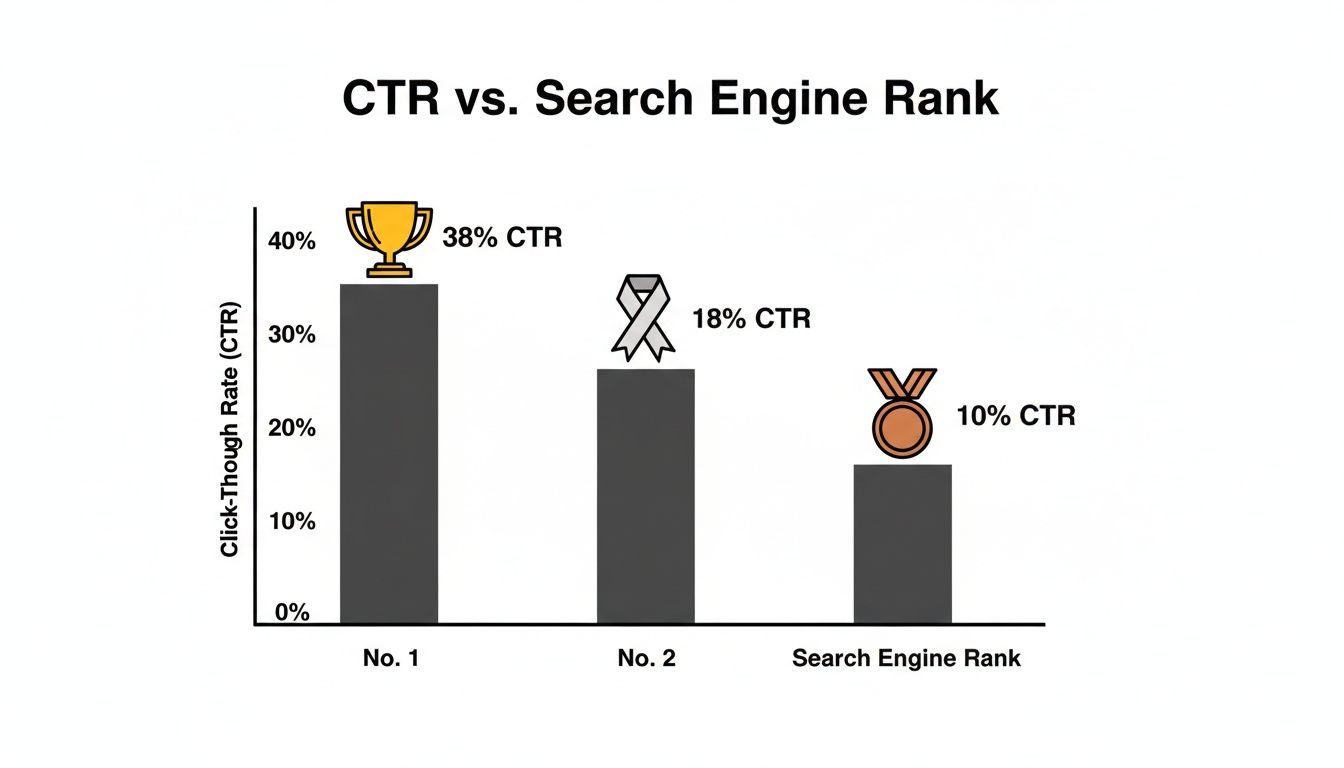
The numbers don't lie. That top spot gets almost four times the clicks of the #3 result. It’s a winner-take-all game, and that's why the fight for #1 is so fierce.
To make this even clearer, here's a breakdown of how your SERP position directly affects the traffic you can expect.
The Impact of Google Ranking on Click-Through Rate (CTR)
This table illustrates the dramatic drop-off in user clicks as ranking position decreases, highlighting why aiming for the top spots is critical.
| SERP Position | Estimated Click-Through Rate (CTR) | Traffic Implications |
|---|---|---|
| 1 | ~39.8% | Captures the lion's share of traffic. A true game-changer. |
| 2 | ~18.7% | Less than half the traffic of the #1 spot. Still valuable. |
| 3 | ~10.2% | A significant drop, receiving roughly a quarter of #1's clicks. |
| 4 | ~7.3% | Traffic begins to thin out considerably. |
| 5 | ~5.1% | You're now competing for scraps of user attention. |
As you can see, the value of each ranking position decreases exponentially. This is why a "good enough" approach to SEO content just doesn't cut it—the rewards are heavily concentrated at the very top.
Beyond Clicks to Business Growth
This is about more than just hitting a traffic goal. When you consistently publish content that ranks, you're building a collection of digital assets that work for you around the clock. Long after you've hit the publish button, a top-ranking article will keep bringing in potential customers.
This approach turns your company blog from a simple marketing channel into a reliable engine for:
- Lead Generation: Catching people right when they're searching for your solutions.
- Brand Authority: Positioning yourself as the trusted expert in your field.
- Sales and Conversions: Guiding users from a simple question to a confident purchase.
Ultimately, mastering SEO content means building a predictable, scalable way to grow your business that doesn't depend on how much you're spending on ads this month.
Decoding Search Intent Before You Write a Word
Before you even think about writing, you need to play detective. The single most important part of creating content that ranks is figuring out why someone typed a specific phrase into Google. This is search intent, and it’s the secret sauce that separates pages that hit number one from those that vanish into the abyss.
Honestly, skipping this step is like showing up to a job interview in your pajamas. You've totally misread the room. You can write the most brilliant article in the world, but if it doesn't match what the searcher is actually looking for, it's dead on arrival.
The Four Flavors of Search Intent
Every search query fits into one of four buckets. Getting a handle on these tells you what's going on in the searcher's head and what kind of page they expect to land on.
Informational Intent: The searcher has a question and needs an answer. They're looking for knowledge, whether it's a simple definition or a complex guide. Think queries like "what is a Roth IRA" or "how to bake sourdough bread." Your job here is to be the expert with the clear, comprehensive answer.
Navigational Intent: The user already knows their destination and is just using Google as a GPS. Searches for "YouTube," "Facebook login," or a specific brand name are classic examples. They aren't looking to learn about the site; they're trying to get to the site.
Commercial Intent: This is the research phase before someone pulls out their wallet. They're weighing options, comparing products, and reading reviews to make the best choice. These queries often contain words like "best," "review," "top," or "vs," such as "best project management software" or "iPhone 15 vs Samsung S24."
Transactional Intent: Game time. The searcher is ready to buy or take a specific action right now. Their query will be direct and often include words like "buy," "discount," "price," or a specific product model. "Buy Nike Air Force 1 size 10" is about as transactional as it gets.
Getting intent right means your content doesn't just answer a question; it ends the search. When a user lands on your page and stays—instead of bouncing back to the search results to find a better answer (a behavior called "pogo-sticking")—it sends a massive signal to Google that you nailed it.
How to Let the SERPs Be Your Guide
So, how do you nail down the intent for your target keyword? Simple: Google will literally show you the answer. The search engine results page (SERP) is a treasure map filled with clues about what searchers want. Stop guessing and start observing.
Your first move should always be to open an incognito browser window (this gives you clean, unbiased results) and type in your keyword. Let’s take our own keyword, "how to write seo optimized content." A quick search reveals a very clear pattern.

The results are overwhelmingly filled with in-depth guides, practical how-to articles, and step-by-step checklists. This screams informational intent. The searcher wants a roadmap, not a sales pitch.
This kind of manual analysis is non-negotiable. If you're looking to go a level deeper, our guide to understanding keyword intent covers some more advanced tactics. The goal is always the same: find the common threads tying the top-ranking pages together.
As you analyze, look for these specific patterns:
- What's the format? Are the top results blog posts? Product pages? Videos? Are they listicles ("Top 10 Ways..."), definitive guides, or quick-hit definitions?
- What's the angle? Who are these articles for? Are they speaking to complete beginners or seasoned experts? Do they focus on speed, low cost, or high quality?
- What features are showing up? Is Google serving up a "People Also Ask" box? A featured snippet at the very top? A carousel of videos? These are direct hints from Google about what satisfies the user's need.
By cataloging these clues, you build a crystal-clear blueprint of what Google considers the "perfect" article for that query. Your job isn't to reinvent the wheel—it's to build a better, faster, and more helpful wheel based on what's already winning.
Crafting a Powerful Keyword-Driven Outline
Alright, you've figured out what your audience is really looking for. Now it's time to build the skeleton of your article. I can't stress this enough: a solid, keyword-driven outline is your single best tool for making sure your content is comprehensive, logical, and actually structured to rank.
This isn't just about jotting down a few topic ideas. It's about strategically mapping out every piece of the puzzle to please both your readers and the search engine bots. Think of it as the blueprint for your article. A good outline stops you from rambling and forces you to cover all the essential subtopics, which is how you build real topical authority. It turns writing from a chaotic mess into a simple "fill-in-the-blanks" exercise.
Building Your Content Framework
Your outline begins with the keyword research you’ve already done. Those keywords aren't just for sprinkling into paragraphs later—they're the actual building blocks of your article's structure. The goal here is to assign your most important keywords to your headings (your H2s and H3s) to create a flow that just makes sense.
Your main keyword is the foundation for your H1 title and should probably show up in your first H2 as well. Your secondary keywords and those longer, more specific long-tail phrases? Those are perfect for your other H2 and H3 subheadings. If you need a refresher, our complete guide to primary keywords in SEO dives deep into how to prioritize these for the biggest impact.
This method creates a clear hierarchy that search engine crawlers can easily follow, telling them exactly what your page is about and which sections hold the most weight.
Integrating User Questions and Related Searches
If you want to create content that genuinely ends the user's search, you have to get ahead of their next question. The best place to find these questions is right on the Google search results page itself.
Take a look at the "People Also Ask" (PAA) box for your main keyword. These are real questions people are typing into Google. Every relevant question you find is a potential H2 or H3 for your outline, guaranteeing you're hitting on common pain points and curiosities.
A quick pro tip: don't just copy and paste the PAA questions. Tweak them to create more engaging headings that fit naturally into your article. This small step makes your content feel more cohesive and less like a robotic Q&A list.
Next, scroll down to the bottom of the page and check out the "Related searches." These terms give you a direct line into what people search for after their initial query. Folding these into your outline broadens your article's scope and helps you start ranking for a whole host of related long-tail keywords.
A Practical Outline Example
Let's make this real. Say our primary keyword is "best coffee tables for small spaces." Here’s how a simple but powerful outline might look after a quick SERP analysis:
- H1: The 15 Best Coffee Tables for Small Spaces in 2025
- H2: What Should I Look for in a Coffee Table for a Small Space?
- H3: Considering Materials and Durability
- H3: Choosing Between Round vs. Rectangular Tables
- H2: Our Top Picks for Every Style and Budget
- H3: 1. The Minimalist Glass-Top Table
- H3: 2. The Multi-Functional Storage Ottoman
- H3: 3. The Rustic Reclaimed Wood Option
- H2: Frequently Asked Questions About Small Space Coffee Tables
- H3: Can I put a coffee table in a very small living room?
- H3: How tall should a coffee table be?
See what we did there? The structure hits the commercial intent ("best"), provides helpful informational content ("what to look for"), and wraps up with a PAA-inspired FAQ section to catch any leftover questions. By building this blueprint first, you're setting yourself up to write a piece of content that's organized, incredibly thorough, and built to perform from day one.
Writing and Optimizing Your Content On-Page
Alright, you've got your keyword-driven outline. Now it’s time to breathe some life into it. This is where you move from blueprint to building, crafting a piece of content that doesn't just check SEO boxes but genuinely connects with a human reader. It's a balancing act, for sure—part art, part science.
Your first impression isn't made on your page; it's made on Google's results page. Your headline (the H1 tag) and meta description are your only shot at convincing someone to click your link instead of the nine others staring back at them.
Think of your title tag as a headline for a billboard on a busy highway. Something like "How to Write SEO Content" is fine, but it’s forgettable. "How to Write SEO-Optimized Content That Actually Ranks"? Now that’s a headline that promises a real result.
Crafting Headlines and Meta Descriptions That Win Clicks
Let's be clear: your H1 tag is probably the single most important on-page SEO element you control. It needs to have your primary keyword, preferably near the front, but it also has to be compelling enough to stop a scroller in their tracks. A great H1 is sharp, clear, and perfectly matches the search intent you figured out earlier.
While your meta description isn't a direct ranking factor, it's your 160-character sales pitch. It's your chance to back up the claim you made in the headline and nudge the searcher to take action.
Let's imagine our keyword is "best coffee tables for small spaces."
- Weak Meta Description: This article is about coffee tables. We list many different types of coffee tables for people who have small living rooms. (Yawn.)
- Strong Meta Description: Searching for the perfect coffee table for your tiny space? Discover our top 15 picks, from rustic wood to modern glass, and find a stylish solution that fits your home and budget.
See the difference? The second one is specific, uses related terms ("modern glass," "rustic wood"), and speaks directly to the searcher's problem.
Writing Body Content for Readers and Robots
Once you've earned the click, the next challenge is to keep them on the page. That means your content has to be readable, genuinely helpful, and engaging. The old days of stuffing your keyword in every other sentence are long gone. Thank goodness. Today, it’s all about writing naturally.
Make sure your primary keyword appears early, ideally in the first 100 words or so. From there, your focus should be on weaving in your secondary keywords and related concepts where they naturally fit. You're trying to build topical authority and show Google you've covered this subject from every important angle.
Writing for SEO isn't about keyword density; it’s about answering a user's question so completely that they have no reason to hit the back button. When you end their search journey on your page, you're sending one of the strongest possible quality signals to Google.
Break up the text. Seriously. Nobody wants to face a solid wall of words.
Keep your paragraphs short—two or three sentences, max. Use formatting to create visual guideposts for the reader's eye:
- Bold Text: Use it to make key terms, stats, or takeaways pop.
- Bullet Points: Perfect for breaking down lists or steps into scannable chunks.
- Subheadings (H3s): These organize your content into logical sections, letting people jump to exactly what they need.
Speaking of comprehensive content, the data is pretty clear: longer, in-depth pieces tend to perform better, provided they nail the user's intent and earn links. Multiple analyses from 2024–2025 show that articles over 3,000 words get significantly more organic traffic and shares. One report even found that long-form content can pull in roughly 3x more traffic and 3.5x more backlinks than posts closer to the 1,400-word average.
Implementing Smart Internal Linking
Internal linking is one of the most powerful—and most overlooked—on-page SEO tactics. It’s how you build a logical pathway for both your readers and search engine crawlers, distributing authority and showing how your content is related.
As you write, be on the lookout for natural opportunities to link to other relevant posts on your site. Don't force it. Every internal link should add real value, giving the reader a path to learn more about a related sub-topic.
For example, in a broad post about content writing, it makes perfect sense to link out to a detailed guide on a specific part of that process. For a deeper dive, you can check out our complete on-page SEO checklist for essential optimization techniques.
Always use descriptive anchor text for your links. Forget generic phrases like "click here." Instead, use text that clearly tells both the user and Google what the destination page is about, like "learn more about technical SEO." This simple habit reinforces the topical relevance of both pages and helps build a stronger, more authoritative website.
Advanced Optimization And Performance Measurement

Hitting "publish" isn't the finish line; it’s the starting block. Your content's real journey begins now. The best SEO content isn't a "set it and forget it" asset. It’s a living thing that you need to nurture, refine, and improve over time. This is where we move beyond the basics and start turning good articles into long-term traffic drivers.
It all starts with giving search engines a clearer, more structured look at what your content is about. We do this with something called structured data, better known as Schema markup.
Schema is a bit of code you add to your page that acts like a translator for search engines. It explicitly defines elements of your content, which helps Google understand it on a deeper level. In return for this clarity, Google might reward you with rich results—those eye-catching extras like star ratings, event times, or FAQ dropdowns that make a listing pop on the search page.
Earning Rich Results With Schema Markup
Don't worry, you don't need to be a developer to get started. For most articles and blog posts, two types of Schema offer the biggest bang for your buck: 'Article' and 'FAQPage'.
Article Schema: This is foundational. It tells Google flat-out, "This is an article." You can include details like the author's name, publication date, and headline, which helps establish credibility and provides essential context.
FAQPage Schema: This one is a game-changer. If you have a question-and-answer section, this markup can make those Q&As appear as interactive dropdowns right in the search results. Not only does this take up more real estate on the results page, but it can also seriously boost your click-through rate.
You can create this code in minutes using a free online Schema generator. Just fill out a simple form, and it spits out the code snippet you need. It’s a small effort for a potentially massive gain in visibility.
Measuring Performance In Google Search Console
With your content live and optimized, it's time to see how it’s really doing. Your most important tool for this job is Google Search Console (GSC). It's a free platform that gives you a direct, unfiltered look at your site's performance in Google Search.
GSC is all about raw data. It cuts through the vanity metrics and shows you what matters, allowing you to make truly informed decisions about what to do next.
Here’s a look at the essential metrics you’ll be tracking. This data gives you a direct feedback loop on whether your content strategy is actually working.
Key Performance Indicators (KPIs) For SEO Content
| Metric | What It Measures | Actionable Insight |
|---|---|---|
| Impressions | How many times your page appeared in search results for a given query. | Seeing high impressions but getting very few clicks? Your title or meta description likely isn't grabbing attention. |
| Clicks | The number of times someone actually clicked your link from the search results page. | This is your traffic. If clicks are low, you're not convincing users that your page has the answer. |
| Click-Through Rate (CTR) | The percentage of impressions that led to a click (Clicks ÷ Impressions). | A low CTR is a huge red flag that your SERP appearance isn't compelling enough to beat the competition. |
| Average Position | The average ranking of your page for a specific keyword over time. | If you see this number slowly creeping up (e.g., from 8 to 15), your content is likely losing relevance and needs a refresh. |
Think of GSC as your content's report card. It tells you what’s working and, more importantly, where you have room to improve.
Finding Opportunities For Content Refreshing
Your job now is to become a data detective. You’re looking for patterns that signal an opportunity to make a high-impact change. The most valuable activity here is identifying content that's almost performing well and giving it the push it needs.
Keep an eye out for pages with these tell-tale signs:
High Impressions, Low CTR: This is the golden opportunity, what I call the "striking distance" scenario. Google is showing your page to a lot of people, which means it considers your content relevant. But users aren't clicking. The fix is often as simple as rewriting your title tag and meta description to be more compelling.
Slipping Rankings: Look for keywords where you used to rank in positions 5-10 but have now fallen to 11-20. This almost always means a competitor has published something better or your content has gone stale. A content refresh—adding new data, updating statistics, embedding a new video, or expanding a section—can often bump it right back onto page one.
Your published content is not set in stone. By regularly monitoring performance and taking targeted action, you transform your blog from a static library into a dynamic growth engine that continuously adapts to win in the search results. This iterative process is essential for learning how to write SEO optimized content that delivers sustained results.
Got Questions? Let's Get Them Answered
Even with the best game plan, you're bound to run into some specific questions when you're deep in the weeds of writing SEO content. Let’s tackle some of the most common ones I hear all the time.
So, How Long Should an SEO Article Actually Be?
Ah, the million-dollar question. The honest answer? There’s no magic word count. But if you look at the data, a clear pattern emerges: longer, more comprehensive content almost always outperforms for competitive keywords.
We consistently see articles in the 2,000 to 4,000-word range do exceptionally well. Why? Because at that length, you can dig deep, answer multiple related questions, and give the reader everything they need in one place. That kind of thoroughness is what earns backlinks and signals real authority to Google.
But here's the crucial part: always prioritize satisfying the search intent. If you can nail the user's query in 1,500 words, don't just add 500 words of fluff to hit a target. Quality and completeness will always trump an arbitrary word count.
What’s the Right Keyword Density to Aim For?
Let’s clear this up right now: keyword density is a relic of the past. Forget about it. Seriously. Chasing a specific percentage is a surefire way to create clunky, unreadable content. Google’s algorithms are way too smart for that now and will penalize you for "keyword stuffing."
Here’s what you should do instead:
- Place your main keyword where it counts. Make sure it appears naturally in your title tag, H1 heading, meta description, and somewhere in your introduction (ideally the first 100 words).
- Think topically, not just about one keyword. Weave in synonyms, related concepts, and LSI keywords throughout your writing. It's how people actually talk and write.
- Focus on the reader's questions. When you're obsessed with providing the best answer, you'll naturally use the right language and terminology without even trying.
Google understands context. Your job is to create a comprehensive resource on a topic, not to repeat a phrase a certain number of times.
How Often Do I Need to Update Old Content?
Refreshing old content is one of the most powerful—and underrated—SEO tactics out there. It tells search engines your site is active and your information is still relevant. I recommend my clients do a content audit every 6 to 12 months.
Here’s what you’re looking for during that audit:
- Bleeding Traffic: Find posts whose traffic has been slowly dying off over the past few months. These are your prime candidates for a refresh.
- "Striking Distance" Content: Look for articles ranking on page two (positions 11-20). A solid update can often be the final push they need to jump to page one.
- Stale Information: Pinpoint anything with outdated stats, broken links, or advice that's just plain wrong in today's world.
Go in, add new information, update your data, fix broken links, and add some new internal links. You’d be surprised how much of a boost a simple refresh can provide.
Can I Just Use AI to Write My SEO Content?
AI tools are fantastic assistants, but they aren't expert authors. They can be incredibly helpful for brainstorming ideas, structuring an outline, or even banging out a rough first draft. It can save you a ton of time.
But here’s the reality: top-ranking content needs a human touch. Your personal experience, unique insights, and authoritative voice—what Google calls E-E-A-T (Experience, Expertise, Authoritativeness, and Trustworthiness)—are what truly set you apart. AI simply can't fake that.
Use AI as a co-pilot. Let it handle the grunt work, but always have a human expert in the driver's seat to refine the content, check the facts, and inject the unique value that makes people (and Google) trust you.
Stop wondering if your content will rank and start seeing results. Rankai combines expert strategy with AI automation to publish 20+ fully optimized articles on your site every month, complete with continuous performance monitoring and rewrites until they rank. See how we drive reliable organic growth at https://rankai.ai.